
GEPCO Bill Check online, Duplicate Bill, Payment, Tariff & complaint Guide (2026)
Last updated: September 2026
If you live in Gujranwala, Sialkot, Gujrat, Narowal, Hafizabad, or Mandi Bahauddin, GEPCO is probably the name printed at the top of your electricity bill. GEPCO stands for Gujranwala Electric Power Company, one of the power distribution companies operating under WAPDA in Punjab. Every month, millions of households and small businesses in this region wait for their bill so they can plan their budget and pay on time.
This page is put together with the help of someone who has actually worked inside Pakistan’s power distribution sector for close to two decades, not just someone who Googled the process. That background shapes how this guide is written: less “official manual,” more “here’s what actually happens and why.” This site is an independent consumer tool, not GEPCO’s official portal, but the explanations here come from real, hands-on familiarity with how billing, complaints, and connections genuinely work behind the scenes.
Check Your GEPCO Bill Online
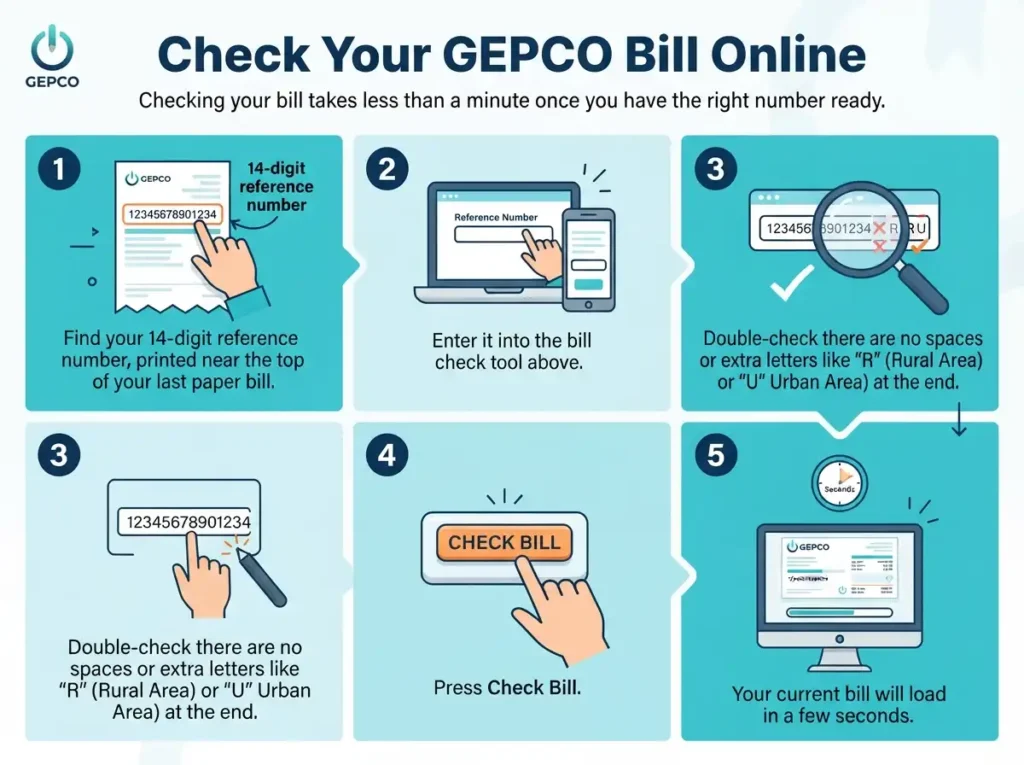
Checking your bill takes less than a minute once you have the right number ready.
- Find your 14-digit reference number, printed near the top of your last paper bill.
- Enter it into the bill check tool above.
- Double check there are no spaces or extra letters like “R” (Rural Area) or “U” (Urban Area) at the end.
- Press Search.
- Your current bill will load in a few seconds.
No old bill on hand? Try your Customer ID instead, which is a shorter number some banking apps also accept.
A tip worth knowing: most “bill not found” errors people report have nothing to do with the system being down. In almost every case it’s traced back to one wrong digit in the reference number. Before assuming something’s broken on our end or GEPCO’s end, just slow down and recheck each number carefully.
Downloading Your Duplicate Bill
A duplicate bill is simply a fresh copy of your original one, useful if your paper bill was lost, torn, or never delivered. Once your bill loads on screen, look for the download or print option and save it as a PDF. Most banks and payment apps accept this downloaded copy without any issue.
How to Pay Your GEPCO Bill
You have several options here, and honestly, which one is best depends on what you value more, speed or saving a few rupees.
- Bank branches, HBL, UBL, MCB, Allied Bank, National Bank, Bank Alfalah, and most others accept GEPCO payments over the counter.
- Mobile apps, JazzCash, EasyPaisa, and most bank apps let you pay in under a minute.
- ATMs, many bank ATMs now have a bill payment option built in.
- Online banking, add GEPCO as a biller if your bank offers internet banking.
Mobile apps are fastest but sometimes charge a small convenience fee, while paying at a bank counter is usually free but takes longer. For a large commercial bill, that small fee difference can add up over a year, so it’s worth comparing once in a while. Whatever method you choose, keep the receipt or screenshot, it’s the fastest way to prove payment if your bill ever shows as unpaid by mistake, which does happen occasionally due to processing delays between the bank and the billing system.
GEPCO Tariff & Unit Rates 2026
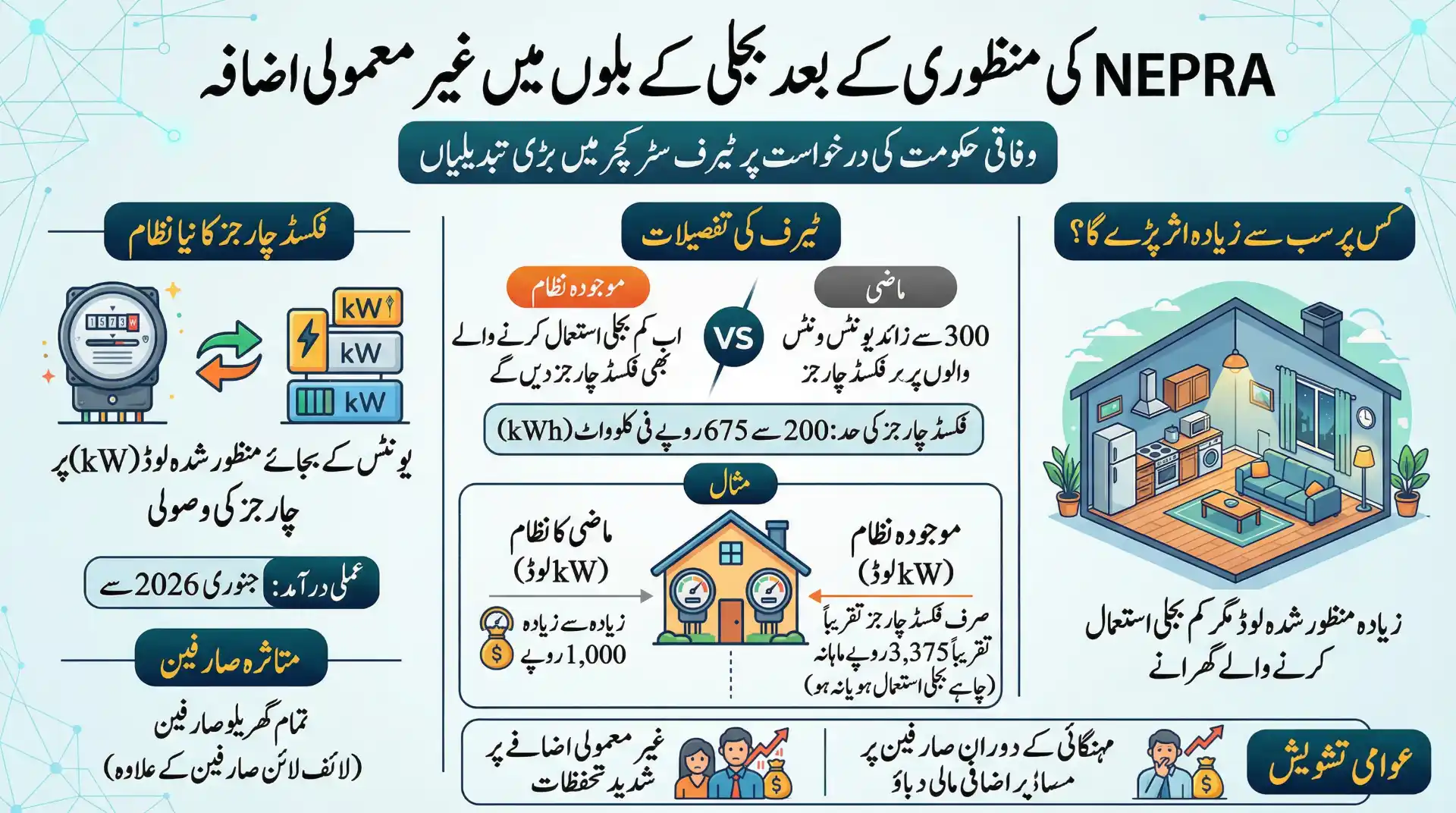
Knowing your rate helps you understand your bill before it even arrives. GEPCO follows NEPRA approved tariffs that change based on your connection type, meter type, and monthly usage.
Residential Rates (Single Phase, Standard Meter)
Most homes fall under the slab system below. The more units you use, the higher the rate on the extra units.
| Units Used | Rate per Unit (Approx.) |
| 1 to 100 | Rs. 22.44 |
| 101 to 200 | Rs. 28.91 |
| 201 to 300 | Rs. 33.10 |
| 301 to 400 | Rs. 36.46 + fixed charge |
| 401 to 500 | Rs. 38.95 + fixed charge |
| 501 to 600 | Rs. 40.22 + fixed charge |
| 601 to 700 | Rs. 41.85 + fixed charge |
| Above 700 | Rs. 47.20 + fixed charge |
These are unprotected residential rates. Protected and lifeline consumers pay less under a separate category, and taxes plus monthly fuel adjustments are always added on top.
Residential Time of Use (3-Phase Meter)
If your sanctioned load is above 5kW, you’re likely on a 3-phase meter billed by time of day instead of a flat slab.
| Time Period | Rate per Unit (Approx.) |
| Peak Hours | Rs. 46.85 |
| Off-Peak Hours | Rs. 34.53 |
Shifting heavy appliance use away from evening peak hours can genuinely lower this type of bill.
Commercial Rates
| Category | Rate per Unit (Approx.) |
| Commercial (under 5kW) | Rs. 37.44 + fixed charge |
| Commercial (TOU / larger load) | Varies by peak and off-peak usage |
These base rates don’t include Fuel Price Adjustment, Electricity Duty, GST, and other monthly surcharges, which shift slightly each billing cycle. For the full breakdown of every single line on your bill, our complete guide to every GEPCO bill charge explains each one in plain language.
Quick estimate trick: multiply your expected units by your slab rate, then add roughly 20–25% for combined taxes and adjustments. It won’t match exactly, but it’s a fair ballpark before your real bill arrives.
For current bill estimation use out BILL CALCULATOR
Registering a GEPCO Complaint
Wrong bill amount, faulty meter, or an unexplained outage, GEPCO gives you more than one way to raise it.
- CCMS Online Portal, the official system for billing, meter, and supply complaints.
- Official complaint form, available at gepco.com.pk under the Complaint section.
- Helpline 118, available 24/7, with alternate numbers +92-55-9200504, +92-55-9200516, and +92-55-9200592 if the main line is busy.
- Division-wise contact list, GEPCO publishes contact details for each division and sub-division office on its official site, useful if your issue needs a local visit.
- NEPRA escalation, if GEPCO doesn’t resolve your complaint in reasonable time, you can escalate through the NEPRA Asaan Approach app, the official regulator-level channel.
One thing worth knowing from the inside: complaints that include specific details, exact units, the amount charged, and a comparison to your last correct bill, get processed faster than vague ones. A complaint that just says “bill is wrong” often bounces back with a request for more information before anyone can actually act on it. Being specific the first time saves you a second round entirely.
Applying for a New GEPCO Connection
Moving into a new home or opening a shop means applying for a fresh connection. The process generally looks like this:
- Apply through GEPCO’s Electricity New Connection (ENC) system, either at your local office or online.
- Submit your CNIC copy, proof of property or a rent agreement, and a passport-size photo.
- Pay the connection fee and any required security deposit.
- Wait for a site inspection and meter installation.
- Receive your first bill along with a new reference number.
PITC, the company behind GEPCO’s digital services, also runs an official app called Roshan Pakistan (also known as the One Window App) that lets you apply for and track a new connection from your phone instead of visiting an office repeatedly.
How Much a New Connection Actually Costs
GEPCO has been shifting to AMR meters (Automated Meter Reading) for new connections, and this is what most applicants are billed for today rather than the older meter types.
| Item | Approx. Cost |
| Single Phase AMR Meter | Rs. 17,500 |
| Single Phase Security Deposit | Rs. 2,440 |
| Three Phase AMR Meter | Rs. 48,256 |
| Three Phase Security Deposit | Varies by sanctioned load |
These figures cover the meter cost and standard connection charges. Your total can still shift a bit depending on your exact load and category, so treat these as a reliable starting estimate rather than a final number.
One detail a lot of applicants miss: if the distance between the nearest GEPCO pole and your meter board is more than 100 meters, a separate pole and demand notice kicks in. This covers the LT (Low Tension) wire, the additional pole itself, and any other equipment needed to physically extend the line to your property. It’s billed on top of the standard meter and security cost, and the amount depends entirely on how far that extension needs to go, so it’s worth asking your local office for a site-specific estimate before you budget for the connection.
Load Shedding by Area
Load shedding schedules aren’t the same across all of GEPCO’s territory, Gujranwala’s timing can differ from Sialkot’s or Hafizabad’s, since GEPCO announces schedules by feeder rather than company-wide. Check your city’s dedicated load shedding page on this site for the schedule that actually applies to you.
Net Metering and Solar Savings
If you have solar panels, net metering lets you send unused electricity back into the GEPCO grid and get credit for it. During the day, your panels generate power; anything you don’t use goes back to the grid and shows up as a credit on your bill. At night, you draw from the grid as usual, and the credit offsets part of that cost.
It’s not an instant fix, there’s an upfront cost for panels and an inverter, but for households already running heavy daytime loads like air conditioners, the savings add up over time. Our full net metering guide covers application steps and realistic savings in more detail.
Understanding Your Meter’s Fault Lights
Modern GEPCO meters have small blinking lights that flag wiring problems. A light blinking with your load is completely normal, it’s just counting units. But a light triggered by a cross connection, a shared neutral wire, or water touching a wire usually means a real fault that needs a technician. Our electricity meter fault lights guide walks through each light and what it means.
A Few Ways to Lower Your Bill
- Track units, not just rupees, the amount changes with tariff shifts, but units show your real usage pattern.
- Use the SMS meter reading service to catch a sudden jump before the bill even arrives.
- Service your AC regularly, a poorly maintained unit can quietly use more electricity for the same cooling.
- Compare bills month to month, an unexplained spike is worth checking on the meter, not just assuming it’s correct.
AMI Meters and Transformer Wise Monitoring: How Your Bill Gets Cross-Checked
GEPCO, like other WAPDA distribution companies (DISCOs) across Pakistan, now checks AMI (Advanced Metering Infrastructure) meters using a transformer-wise monitoring system. This modern method helps catch billing errors, power theft, and line losses before they affect honest customers.
Here’s how it works:
- Input Units: The total electricity that leaves a transformer is recorded.
- Billed Units: The combined reading from all AMI meters connected to that same transformer is also recorded.
- Comparison: If there’s an unusual gap between the Input Units and the Billed Units, it means some electricity is being lost or used without being billed. This gap is called a line loss.
- Recovery and Action: If the investigation finds the cause is an illegal connection, meter tampering, or electricity theft, the responsible person can face recovery charges and legal action.
Why this system matters:
- It keeps bills fair and accurate for honest, paying customers.
- It helps GEPCO quickly find illegal connections or faulty meters.
- It builds trust between the power company and the people it serves.
What you can do:
- Check your meter reading now and then, and watch for any sudden jump in usage.
- If your bill seems higher than what you actually used, report it through GEPCO’s CCMS complaint system or call the helpline at 118.
- Never tamper with a meter or use an illegal connection. It’s against the law, and it can also raise line losses (and bills) for everyone else on the same transformer.
What Is an AMR Meter?
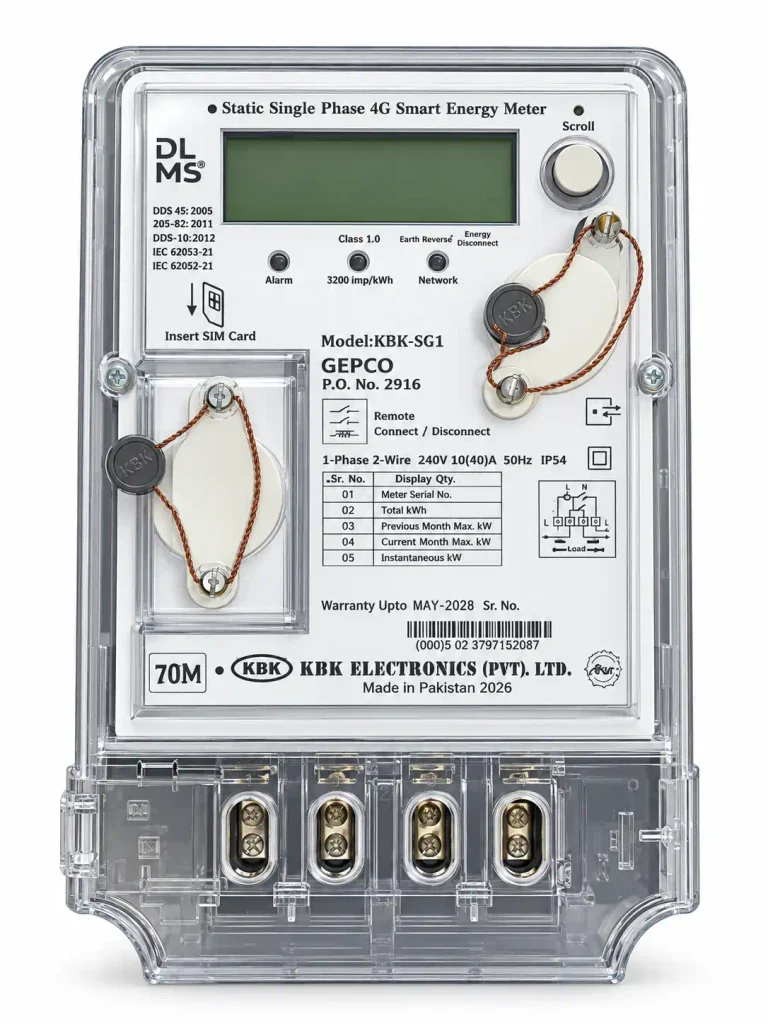
An AMR (Automated Meter Reading) smart meter has a built in SIM card that sends your electricity reading directly to GEPCO’s head office computer system. This means no one has to visit your home to read the meter by hand. Because the reading is sent automatically, there’s almost no chance of a wrong or unfair bill. Issues like over-billing or under-billing become a thing of the past.
Why AMR Meters Are the Future
GEPCO plans to shift all consumers to AMR meters in the coming years, and this change will make bill recovery much easier for the company. If a consumer doesn’t pay their bill for two or three months, the AMR system can automatically disconnect their meter straight from the computer center. There’s no need for a technician to visit and manually cut the connection. This makes the whole billing and recovery process faster and more reliable.
Frequently Asked Questions
Can I check my GEPCO bill without a reference number?
Yes, your Customer ID usually works as an alternative, especially through banking apps.
Why does my bill say “bill not found”?
Almost always a typing issue, an extra letter or a missing digit in the reference number. Recheck it slowly.
Does GEPCO accept CNIC for bill checking?
No. You need your 14 digit reference number or Customer ID; CNIC alone isn’t supported.
How do I know if my area has load shedding today?
Schedules vary by feeder, so check your specific city’s page rather than a general company-wide timing.
Is net metering worth it for a small home?
For homes with meaningful daytime usage, yes, over time, though savings depend on your system size and how much power you actually use during the day.
What number do I call for a GEPCO complaint?
Helpline 118, available 24/7, with +92-55-9200504, +92-55-9200516, and +92-55-9200592 as backups if the main line is busy.
Can transformer wise monitoring make my bill go up for no reason?
No, this system is meant to protect honest customers, not overcharge them. It’s designed to catch electricity theft and faulty meters, so genuine users typically don’t see any unfair increase because of it.
What happens if I don’t pay my AMR meter bill for a few months?
If a bill goes unpaid for two or three months, GEPCO’s computer center can automatically disconnect an AMR meter without sending anyone to your home.
Why Trust This Guide
This page is written and updated based on real GEPCO procedures, the official portal, and nearly two decades of hands on experience inside Pakistan’s power distribution sector. It is not GEPCO’s official website, and we are not affiliated with GEPCO or WAPDA, this is an independent tool built to make bill checking, payments, and complaints easier to understand for everyday consumers. If a process, rate, or contact number changes on GEPCO’s side, this page gets updated to match. Spot something outdated? Reach out through our contact page and we’ll fix it.